
In short: The free GEO Check now covers 37 signals instead of 24. Most of what is new concerns trust: who is behind the page, who wrote the text, and is an AI allowed to quote from it at all? There is also a separate check for YouTube videos. If you enter a YouTube link in the regular check, you are sent there automatically. Both are free to use, without an account.
I am not writing this as a changelog. What interests me is which questions you can now answer with the check that used to stay open. There are four.
1. Can an AI tell who is behind my page?
A language model reads a page with no prior knowledge. It sees a text and has to decide whether to trust it. To do that it looks for details that can be verified: a company with a name, a person as the author, an address, a legal notice. Without them, the page is one more anonymous text.
So the check now looks at three things:
- A company or person in the structured data. Does the source code say who owns the page, and are the official profiles linked there, such as LinkedIn or a Wikipedia entry? That link is how an AI recognises a brand.
- The author as a person. On articles, the check looks for a named human author. On product pages or homepages it does not ask, because no author is missing there.
- Links to legal notice, contact and about pages. They show who is accountable for the content.
On the homepage there is a fourth check: is the name of the website itself declared? It sounds trivial and is missing surprisingly often.
2. Is an AI allowed to quote from my page?
Until now the check looked at whether a page may be indexed. That is not enough. A page can be indexable and still forbid every quote. The directives for that are nosnippet and max-snippet:0. They sit either in the source code or, easy to overlook, in a response header sent by the server. You cannot see that header in the browser.
The check now reads both places. When it reports a problem here, it is usually an accident: a setting in an SEO plugin or an old server rule. For AI answers it has the same effect as an invisible page.
From robots.txt the check also reads two more things: whether a sitemap is declared there, and whether search and AI agents are slowed down with Crawl-delay. Most agents ignore that directive; the rest discover new pages more slowly.
3. Can an AI find the answer on my page?
People ask AI systems whole questions. A page whose headings pick up those questions is easier to match to them. The check therefore counts how many subheadings are phrased as a question.
Two checks on structure come with it. If a page jumps from a second-level heading straight to a fourth, the outline that sections are lifted from breaks. And if the main content is marked up as such in the source code, a machine can separate it from navigation and footer. Headings in the footer are deliberately left out of the count.
Smaller, but visible: the check now looks at the link preview. Without a title, description and image for the preview, a linked source shows up in a chat with nothing at all. It also checks whether the language of the page is declared.
4. And what about my YouTube video?
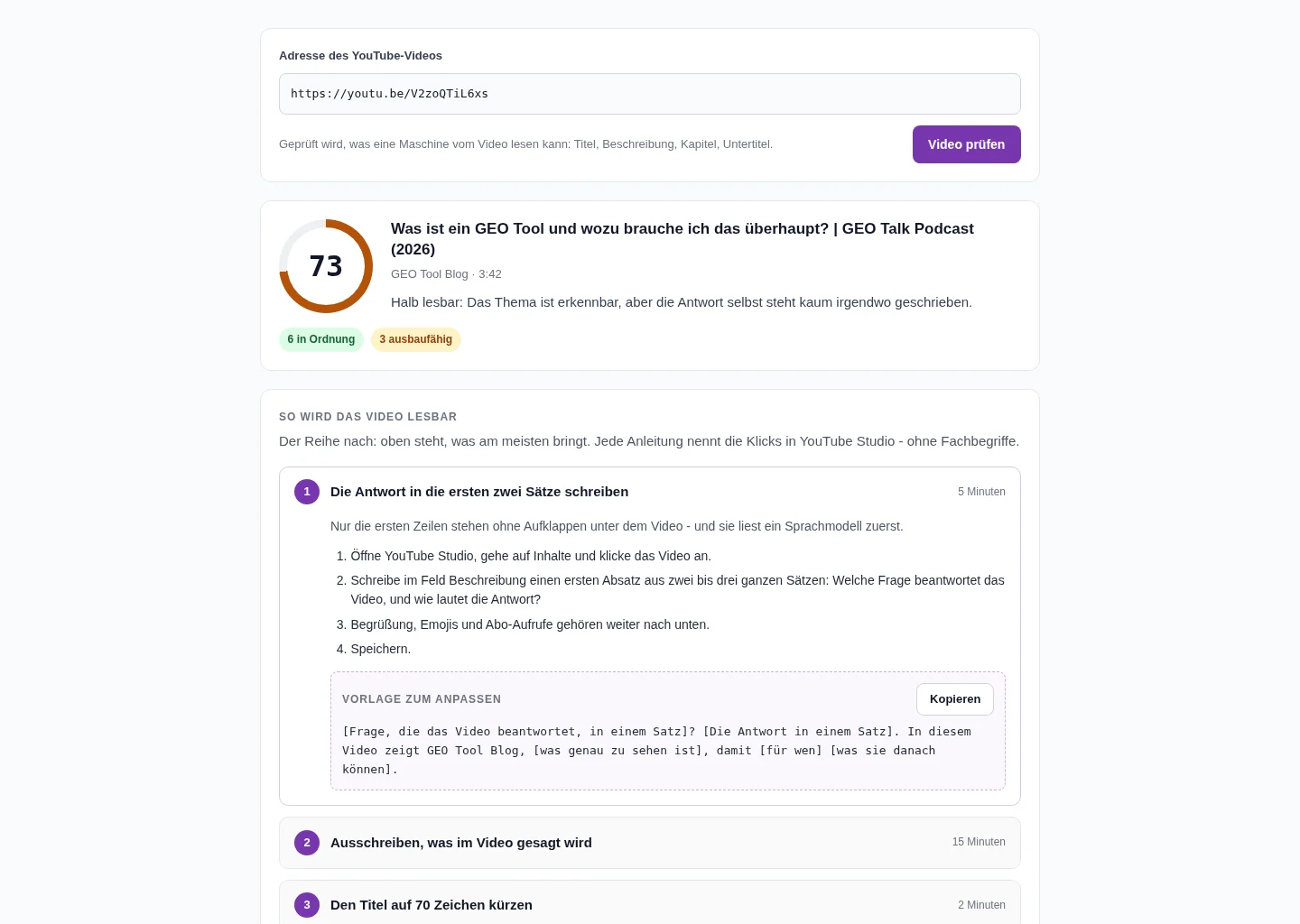
Lately people kept entering YouTube links into the website check. The result was worthless, because what got scored was YouTube's page shell, not the video. Now something useful happens: enter a video link and you land in the YouTube GEO Check.
The idea behind it is simple. For search answers an AI works mostly with text. It reads the title, the description, the chapters and the transcript. A carefully produced video with a two-line description is nearly empty to it.
The check scores ten points, among them:
- Is the answer in the first sentences of the description?
- Are there chapters with timestamps, so a single part can be pointed to?
- Has the channel uploaded its own captions? Automatic captions regularly misspell brand and product names.
- Does a link lead to the page where the answer is written out?
- Is the title phrased the way people ask?
More important than the number is the part below it. For every point that costs score there is a guide in plain language: where to click in YouTube Studio and what to write. The guides are ordered by how much they help, each with a rough time estimate. For chapters, the opening paragraph, the title and the link there are templates to copy. The chapter template adapts to the length of the video.
What the check cannot do
The GEO score describes how readable a page or a video is for machines. It does not say whether ChatGPT, Gemini or Perplexity actually mention you. Only a measurement of the answers themselves shows that.
The video check has two further limits. It does not read the content of the transcript, so it does not know what is said in the video. That is why the templates are scaffolds with placeholders. And it only detects whether captions were uploaded. YouTube does not reveal whether automatic ones exist.
I deliberately left out checks that every SEO tool runs anyway and that have little to do with AI answers: favicon, security headers, fonts. A higher number of checks does not make a score more meaningful.
Where I would start
- Run your homepage through the free GEO Check and look at the findings on company, author and permission to quote.
- Check the most important page that is meant to answer a customer question. Question headings and structure matter there.
- Put your most-watched video into the YouTube GEO Check and start with the first guide. It usually takes five to ten minutes.
How the score is calculated in detail is explained on the page How the GEO Check scores a page.
Frequently asked questions
Does my previous score change?
Yes, slightly. The new checks shift results by a few points; on our reference pages by zero to five points downward. The order between strong and weak pages stays the same.
What does E-E-A-T mean in the GEO Check?
It means verifiable details about who is behind a piece of content: a company or person in the structured data with linked profiles, a named author on articles, and links to legal notice, contact and about pages.
Can I check videos that are not mine?
Yes. The check only uses public details that YouTube returns for every video. No access to the channel is needed. It does not check channels or playlists, only single videos.
Does the YouTube GEO Check cost anything?
No. Like the website check it is free to use and needs no account.
Ready for better AI visibility?
Test now for free how well your website is optimized for AI search engines.
Start Free AnalysisRelated GEO Topics
Share Article
Make this blog a preferred source
One click and Google will prioritise articles from geo-tool.com in Top Stories and Discover. The setting applies to your account only and can be undone at any time.
About the Author
 G
G- Structured data for AI crawlers
- Include clear facts & statistics
- Formulate quotable snippets
- Integrate FAQ sections
- Demonstrate expertise & authority